.svg)

Article Summary:
SQL 2019 Bug affecting AG Secondaries running VSS Backups and how to fix it. Recently we encountered an issue where Always On Availability Group databases…
Investigating the issue
Recently we encountered an issue where Always On Availability Group databases on a secondary replica were going into a Recovery Pending state. The only way to resume data movement was by restarting the SQL server service on the AG secondary. This issue appeared intermittently and affected different databases. Both the primary and secondary SQL instances were running SQL 2019.
The Windows server was hosted on Azure and a VSS backup was run once an hour. The issue always appeared immediately after the VSS backup had completed. The sequence of events is shown below.
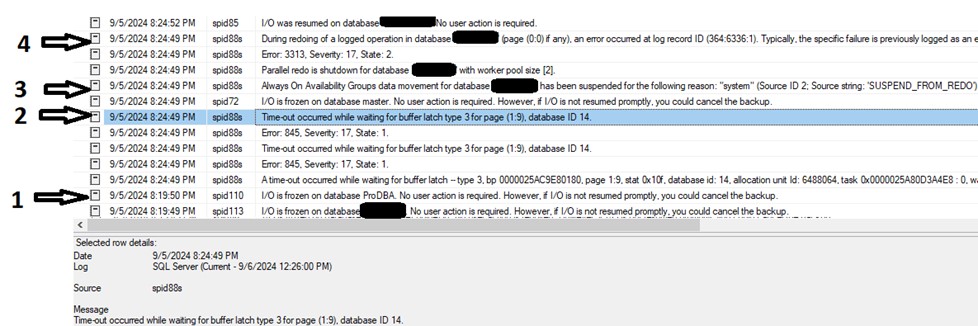
The VSS Service initiates a backup of the VM once an hour.
- As part of this process, the SQL VSS Writer service freezes the I/O for each database to be backed up
- While attempting to unfreeze a database (in this case, database ID 14) a time-out error occurs attempting to access page (1:9)
- Always On data movement is suspended for this database
- An attempt to redo a logged operation against this database fails
At this point the database goes into the Recovery Pending state. Attempting to resume data movement fails.
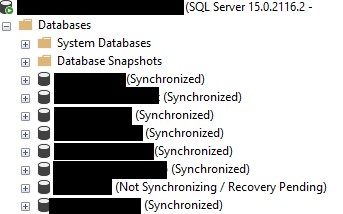
As this appeared to be an issue with the VSS backup, we looked at the SQL VSS Writer service. This service is installed as part of the SQL installation and matches the latest version of SQL installed on the server. In this case this was SQL 2019.
The SQL 2019 VSS Writer Service now logs to a text file : C:\Program Files\Microsoft SQL Server\90\Shared\SqlWriterLogger.txt
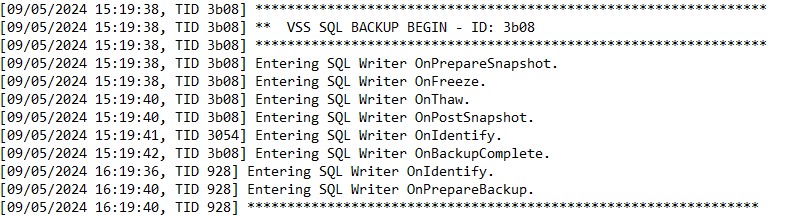
With logging option set to DEFAULT, we can see the steps involved in the hourly backups. (These steps are described in detail in this post : https://learn.microsoft.com/en-us/sql/relational-databases/backup-restore/sql-server-vss-writer-backup-guide?view=sql-server-ver16)
The logging level can be modified via an accompanying ini file.
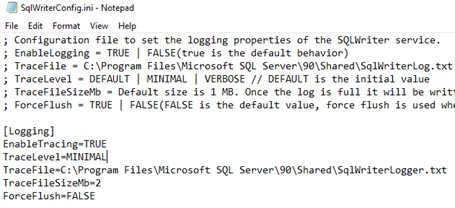
Changing the logging level from DEFAULT to MINIMAL, restarting the SQL VSS Service (while making sure no VSS backup was running at the time) and waiting for the hourly backups to complete produced the following entries in the log.
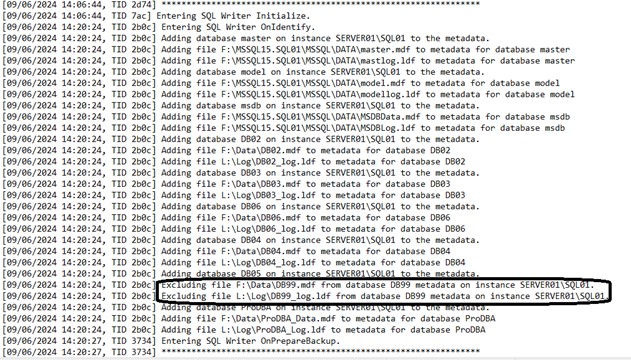
There was nothing untoward in these entries. The only point of note was that the database that was in Recovery Pending was automatically excluded from the backup.
Finally we looked at the latest Cumulative Updates for SQL 2019 to see if there was anything there related to this issue, and lo and behold we found the following :
https://learn.microsoft.com/en-gb/troubleshoot/sql/releases/sqlserver-2019/cumulativeupdate12
Fixes an issue where frozen I/O leads to latch timeout on database boot page (1:9) and leads to suspended availability group database REDO thread.
This exactly describes the issue we were seeing. It also explains why the problem was only occurring on the AG secondary, even though both the primary and secondary replica were patched to the same level. The REDO thread only runs on the AG secondary, not the primary.
Nabil Mahmoud, SQL Server Team Lead.